For years, "content at scale" meant one thing: more people. More writers, more editors, more designers, more hours. That equation has changed. A small stack of AI tools can now carry the repetitive 90 percent of content production and leave only the judgment to a person. This guide lays out that system as a neutral, repeatable process. Follow the eight steps in order and you will have a working content engine.
Before the steps, here is what you are building. A pipeline where a single content brief becomes finished, published posts on five platforms, on a daily schedule, with one person reviewing before anything goes live. It is built for founders, marketers, agencies, and solo operators who need consistent output without hiring a production team, and it costs about $300 to $360 a month per brand, most of which is a fixed publishing subscription that does not rise as volume grows.
Step 1: Define the Daily Output
Start with the output, not the tools. Decide exactly what the engine produces each day before you connect anything. A proven starting point is three assets per day. One short form video of 10 seconds maximum, hook driven and built for feeds and Stories. One long form video of 30 to 90 seconds, explainer or education focused, which is the piece that builds authority. And one banner post, a branded static graphic for announcements and key messages.
Each asset is published natively to all five platforms. Three assets across five platforms equals 15 published pieces a day, or roughly 450 pieces a month. Write this specification down. Every tool you choose next serves this output.
Step 2: Set Up the Publishing Layer
The hardest part of multi-platform posting is not the content. It is the five separate APIs, each with its own authentication, formats, and rules. Solve this first, because it defines what the rest of the pipeline delivers into.
Use a unified social API. Ayrshare collapses all five platforms into one integration that publishes and reformats per destination. Connect the brand accounts for Facebook, Instagram, X, YouTube, and Telegram once, and every later step publishes through this single layer. Budget about $149 a month on the Premium plan, near $152 with tax. This is the largest fixed cost, and it does not increase as daily volume grows.
Step 3: Set Up Video Generation
Two of the three daily assets are video, so this is the engine room. Use two AI video tools on pay as you go pricing and match each to the job. HeyGen handles presenter style and explainer video. Kling handles generative b-roll and motion. Running both lets you assign the right engine to each piece rather than forcing one tool to do everything. At a daily short plus long form output, combined spend runs roughly $3 to $5 a day for high quality generation. This is the main variable cost in the whole stack.
Step 4: Set Up Banner Design
Handle the daily static graphic with branded templates so every banner comes out on brand without manual design work. Canva Pro covers this at about $13 a month, though its list price has been moving toward $15. Build the templates once, then the pipeline populates them.
Step 5: Add Scripting and Voiceover
These two layers turn a brief into a finished, narrated video. An LLM writes every script from the brief, in the brand voice, and rewrites the caption for each platform, because a LinkedIn caption and a Telegram announcement are not the same. Budget about $20 a month in API usage at this volume. For narration, a text to speech engine such as ElevenLabs turns the script into natural sounding audio on the Creator plan at about $22 a month.
Step 6: Orchestrate the Pipeline
Now connect every tool into one automated flow. This is the spine of the system. Use n8n, self hosted on a small server, at about $7 a month. Self hosting gives unlimited workflow runs for the price of the server. The orchestrator triggers each run, passes the script to the voice and video engines, populates the banner template, assembles the output, and hands the finished assets to the publishing layer. One brief enters. Published posts on five platforms come out.
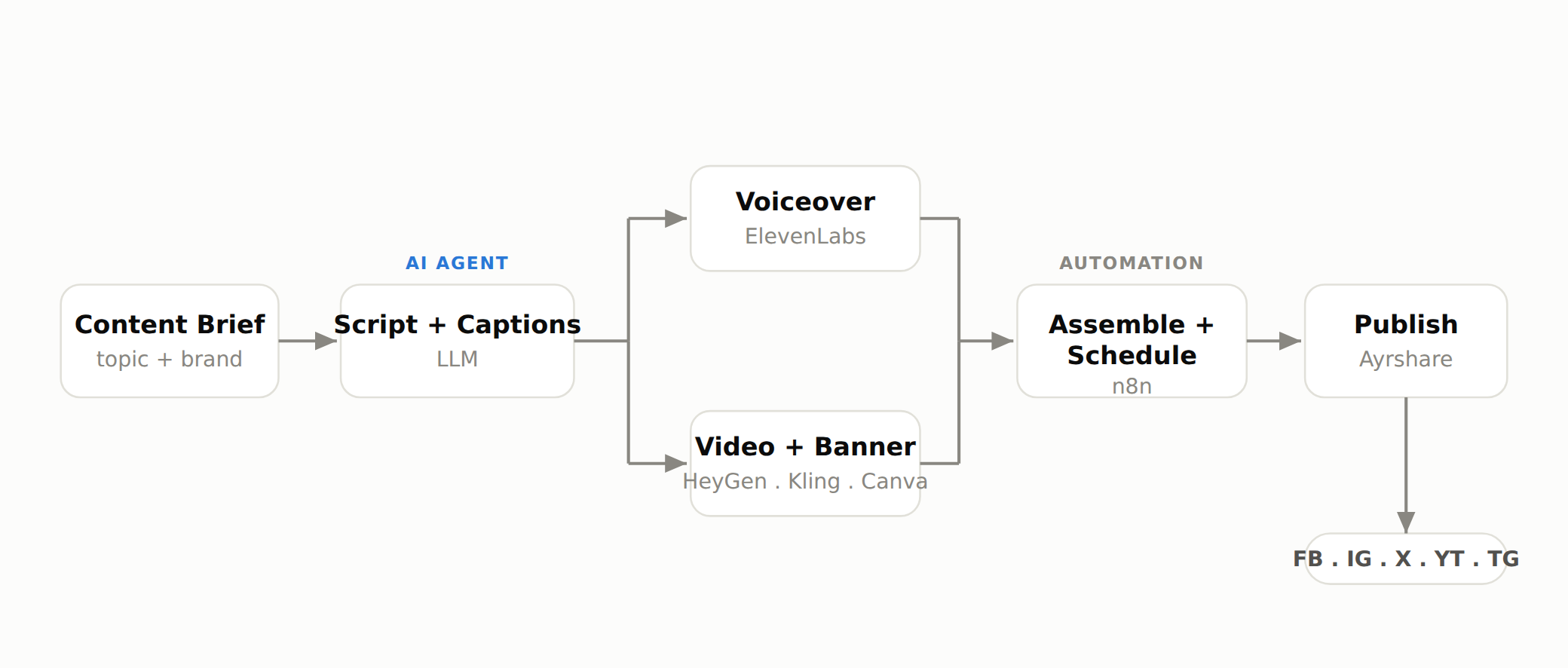
In the diagram above, the blue tagged stage is an AI agent making a judgment call, and the grey tagged stage is fixed automation. That split is the whole design philosophy: let the machine do the repeatable work, and reserve the agent for the parts that need reasoning.
Step 7: Add a Human Review Gate
Before anything publishes, route it to a person. This is the single most important step, and the one most people skip. The engine gets you about 90 percent of the way there. The final 10 percent, the judgment about whether a piece is genuinely good enough to carry a brand name, still belongs to a human.
Set the orchestrator to pause on a review queue. A reviewer approves or edits, then releases the post. This keeps quality high while the automation removes the busywork of formatting and posting across five dashboards. Treat AI here as an enhancer, not a replacement.
Step 8: Budget and Scale
Total the stack before you commit. It splits into fixed monthly subscriptions and one variable line, the pay as you go video.
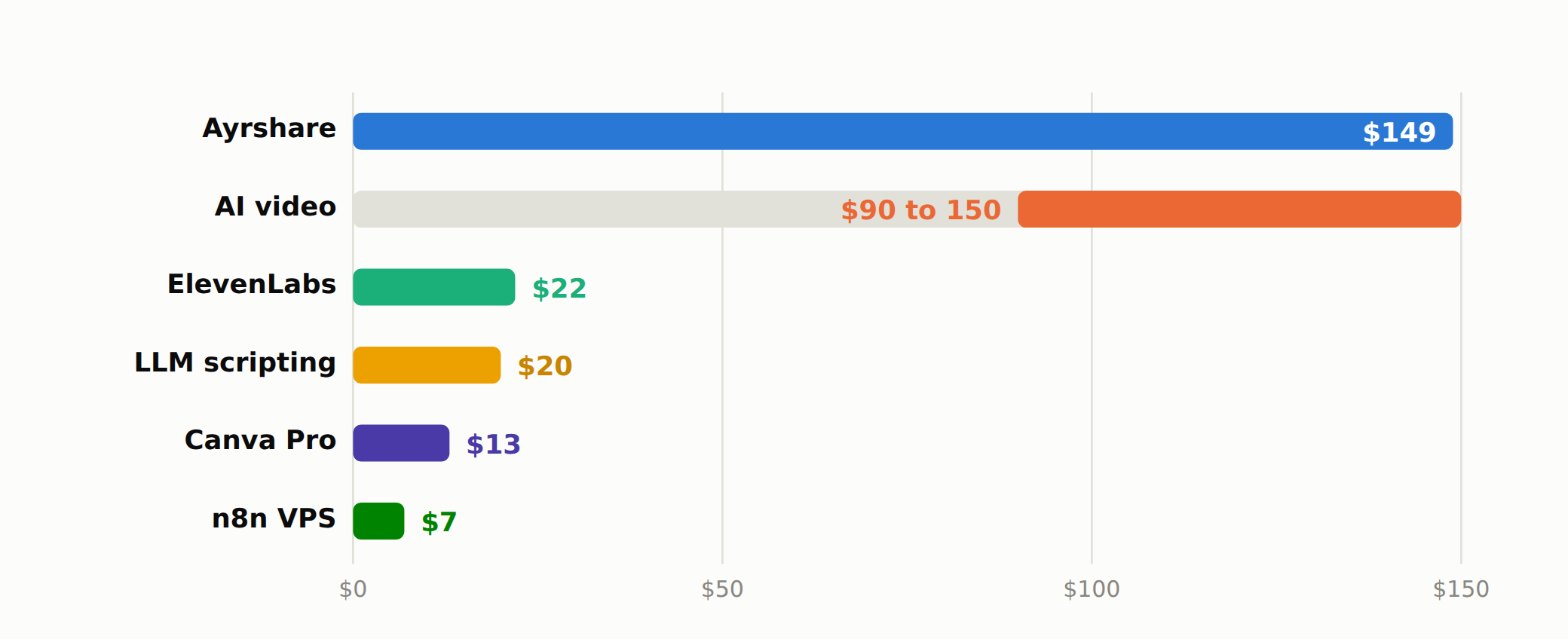
| Layer | Tool | Monthly cost |
|---|---|---|
| Publishing | Ayrshare (Premium) | $149 |
| Video generation | HeyGen + Kling (pay as you go) | $90 to 150 |
| Voiceover | ElevenLabs Creator | $22 |
| Scripting | LLM API | $20 |
| Banner design | Canva Pro | $13 |
| Orchestration | n8n (self hosted) | $7 |
| All in, per brand | $301 to 361 |
The full figure is about $300 to $360 a month: roughly $211 in fixed tools plus $3 to $5 a day on video. The important point for scaling is that the biggest single line, the publishing layer, is fixed. Adding more daily volume raises only the video spend, so the engine scales cheaply until you reach much higher tiers.
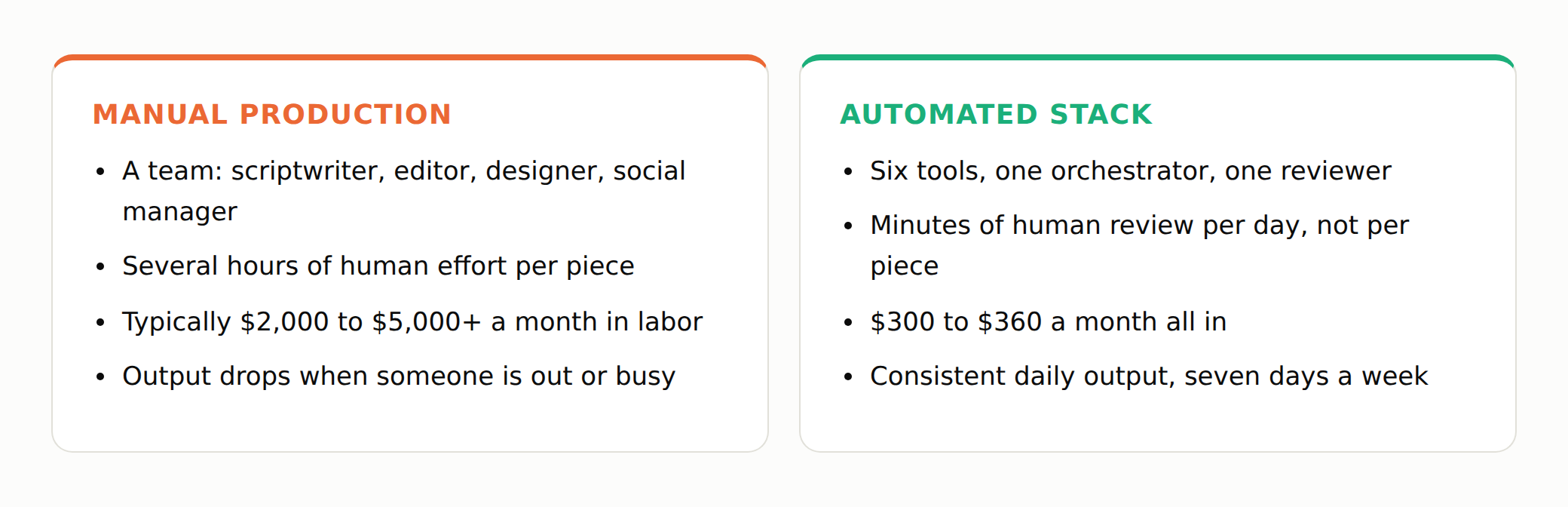
A manual workflow at this volume means a team of specialists and several hours of human effort per piece, typically $2,000 to $5,000 or more a month in labor, with output that drops whenever someone is out. The automated stack runs on six tools, one orchestrator, and one reviewer, needs minutes of review a day rather than hours per piece, and holds a consistent daily output seven days a week. Manual cost figures here are illustrative of a typical multi-role workflow, not a fixed quote.
What Is an AI Agent, and Why Does It Matter Here?
An AI agent is a program built around a large language model that pursues a goal over multiple steps, rather than answering a single prompt. It reasons about what to do next, uses tools such as APIs or generators to act, and checks its own output. In this content system, the agent is not one all knowing brain. It is a chain, where reliable steps run as fixed automation and an agent is dropped in only where judgment is required, such as writing the script or adapting a caption per platform. That hybrid is what makes the engine both cheap and consistent.
The Honest Limit
This process is powerful, but it is not magic. AI does about 90 percent of the work, and it does it well. The last 10 percent, the taste and judgment that decide whether a piece is genuinely good, still belongs to people. Used this way, AI is not a replacement for a content team. It is an enhancer that removes the repetitive work so the humans can spend their time on the part that actually carries the brand. We are still early, and what these tools can do today is a fraction of what they will do in a year. The direction is already clear: build the system, keep the judgment, ship every day.
If you would rather have a content engine like this designed and run for you, Zupai can help you put your content on autopilot without losing the human judgment that makes it worth publishing.